Jumat, 20 Desember 2013
2 Contoh Bisnis Online Terpercaya Tanpa Modal


Sabtu, 07 Desember 2013
Cara Membuat Tabel di Blog 2
Beberapa waktu lalu saya sempat menulis tentang cara membuat tabel diposting. Mungkin ada sobat yang kurang jelas mengenai tutorial dan cara modifikasinya berikut ini adalah lanjutan yang mungkin akan sedikit membantu kita dalam belajar.
<table border="1">
 <tr>
  <td>Cell 1 - Baris 1 Kolom 1</td>
  <td>Cell 2 - Baris 1 Kolom 2</td>
 </tr>
 <tr>
  <td>Cell 3 - Baris 2 Kolom 1</td>
  <td>Cell 4 - Baris 2 Kolom 2</td>
 </tr>
 <tr>
  <td>Cell 5 - Baris 3 Kolom 1</td>
  <td>Cell 6 - Baris 3 Kolom 2</td>
 </tr>
</table>
Hasil:
| Cell 1 – Baris 1 Kolom 1 | Cell 2 – Baris 1 Kolom 2 |
| Cell 3 – Baris 2 Kolom 1 | Cell 4 – Baris 2 Kolom 2 |
| Cell 5 – Baris 3 Kolom 1 | Cell 6 – Baris 3 Kolom 2 |
<table border="1" width="75%">
<tr>
 <td style="width:50%;height:40px;">Baris 1 Kolom 1</td>
 <td>Baris 1 Kolom 1</td>
</tr>
<tr>
 <td>Baris 2 Kolom 1</td>
 <td>Baris 2 Kolom 2</td>
</tr>
<tr>
 <td>Baris 3 Kolom 1</td>
 <td>Baris 3 Kolom 2</td>
</tr>
</table>
Hasil:
| Baris 1 Kolom 1 | Baris 1 Kolom 1 |
| Baris 2 Kolom 1 | Baris 2 Kolom 2 |
| Baris 3 Kolom 1 | Baris 3 Kolom 2 |
<table border="1" width="75%">
<tr>
<td colspan="2">Gabungan Kolom 1&2 pada Baris 1</td>
</tr>
<tr>
<td style="width:50%">Baris 2 Kolom 1</td>
<td>Baris 2 Kolom 2</td>
</tr>
<tr>
<td>Baris 3 Kolom 1</td>
<td>Baris 3 Kolom 2</td>
</tr>
</table>| Gabungan Kolom 1&2 pada Baris 1 | |
| Baris 2 Kolom 1 | Baris 2 Kolom 2 |
| Baris 3 Kolom 1 | Baris 3 Kolom 2 |
<table border="1" width="75%">
<tr>
<td style="width:50%" rowspan="2">Gabungan Baris 1&2 pada Kolom 1</td>
<td>Baris 1 Kolom 2</td>
</tr>
<tr>
<td>Baris 2 Kolom 2</td>
</tr>
<tr>
<td>Baris 3 Kolom 1</td>
<td>Baris 3 Kolom 2</td>
</tr>
</table>| Gabungan Baris 1&2 pada Kolom 1 | Baris 1 Kolom 2 |
| Baris 2 Kolom 2 | |
| Baris 3 Kolom 1 | Baris 3 Kolom 2 |
<table border="1" width="75%" cellpadding="8">
 <tr>
  <td style="width:50%;">Baris 1 Kolom 1</td>
  <td>Baris 1 Kolom 2</td>
 </tr>
 <tr>
  <td>Baris 2 Kolom 1</td>
  <td>Baris 2 Kolom 2</td>
 </tr>
</table>| Baris 1 Kolom 1 | Baris 1 Kolom 2 |
| Baris 2 Kolom 1 | Baris 2 Kolom 2 |
<table border="1" width="75%" cellspacing="8">
 <tr>
  <td style="width:50%">Baris 1 Kolom 1</td>
  <td>Baris 1 Kolom 2</td>
 </tr>
 <tr>
  <td>Baris 2 Kolom 1</td>
  <td>Baris 2 Kolom 2</td>
 </tr>
</table>| Baris 1 Kolom 1 | Baris 1 Kolom 2 |
| Baris 2 Kolom 1 | Baris 2 Kolom 2 |
<table border="1" width="75%">
<caption>Disini adalah titel tabel ini</caption>
 <tr>
  <th style="width:50%;">Header Kolom 1</th>
  <th>Header Kolom 2</th>
 </tr>
 <tr>
  <td>Baris 1 Kolom 1</td>
  <td>Baris 1 Kolom 2</td>
 </tr>
 <tr>
  <td>Baris 2 Kolom 1</td>
  <td>Baris 2 Kolom 2</td>
 </tr>
</table>| Header Kolom 1 | Header Kolom 2 |
|---|---|
| Baris 1 Kolom 1 | Baris 1 Kolom 2 |
| Baris 2 Kolom 1 | Baris 2 Kolom 2 |
<table style="background:#ffc" width="75%" border="1">
 <tr>
  <th style="background:red;width:50%;">Header Kolom 1</th>
  <th style="background:red;">Header Kolom 2</th>
 </tr>
 <tr>
  <td>Baris 1 Kolom 1</td>
  <td>Baris 1 Kolom 2</td>
 </tr>
 <tr>
  <td>Baris 2 Kolom 1</td>
  <td>Baris 2 Kolom 2</td>
 </tr>
</table>| Header Kolom 1 | Header Kolom 2 |
|---|---|
| Baris 1 Kolom 1 | Baris 1 Kolom 2 |
| Baris 2 Kolom 1 | Baris 2 Kolom 2 |
<table cellpadding="0" cellspacing="0" style="background:#ffc" width="75%" border="1">
...
</table><table style="border-collapse:collapse;background:#ffc" width="75%" border="1">
<tr>
<th style="background:red;width:50%;">Header Kolom 1</th>
<th style="background:red;">Header Kolom 2</th>
</tr>
<tr>
<td>Baris 1 Kolom 1</td>
<td>Baris 1 Kolom 2</td>
</tr>
<tr>
<td>Baris 2 Kolom 1</td>
<td>Baris 2 Kolom 2</td>
</tr>
</table>| Header Kolom 1 | Header Kolom 2 |
|---|---|
| Baris 1 Kolom 1 | Baris 1 Kolom 2 |
| Baris 2 Kolom 1 | Baris 2 Kolom 2 |
Senin, 21 Oktober 2013
BlackBerry PlayBook Siap Lawan iPad 2
 |
| BlackBerry PlayBook |
Sabtu, 19 Oktober 2013
Mengenal Berbagai Tipe PLTN di Dunia 2

5. Reaktor Grafit
5.1. Reaktor Pendingin Gas (Gas Cooled Reactor, GCR)
Setelah perang dunia berakhir reaktor GCR adalah salah satu tipe reaktor yang didesain ulang di Inggris maupun Perancis. Reaktor ini menggunakan bahan bakar logam uranium alam, moderator grafit pendingin gas karbondioksida. Bahan kelongsong terbuat dari paduan magnesium (Magnox), oleh karena itu reaktor ini disebut sebagai reaktor Magnox. Reaktor Magnox mempunyai pembangkitan daya listrik cukup besar dan efisiensi ekonomi yang baik. Raktor tipe modifikasi Magnox pernah dibangun di Jepang pada tahun 1967 sebagai PLTN Tokai. Setelah beroperasi selama 30 tahun reaktor ini ditutup pada tahun 1998.

5.2. Reaktor Pendingin Gas Maju (Advanced Gas-cooled Reactor,AGR)
Di Inggris fokus pengembangan teknologi PLTN bergeser ke reaktor berbahan bakar uranium dengan pengayaan rendah, yang memiliki kerapatan daya dan efisiensi termal yang tinggi. Unjuk kerja reaktor ini terbukti dapat diperbaiki. Di Inggris reaktor ini hanya sempat dibangun sebanyak 14 buah saja karena setelah pertengahan tahun 1980 kebijakan Pemerintah Inggris berubah.
5.3. Reaktor Pendingin Gas Suhu Tinggi (High Temperatur Gas-cooled Reactor, HTGR)
Reaktor ini menggunakan gas helium sebagai pendingin. Karakteristik menonjol yang unik dari reaktor HTGR ini adalah konstruksi teras didominasi bahan moderator grafit sehingga temperatur operasi dapat ditingkatkan menjadi tinggi dan efisiensi pembangkitan listrik dapat mencapai lebih dari 40%. Terdapat 3 bentuk bahan bakar dari HTGR, yaitu dapat berupa: (a) Bentuk batang seperti reaktor air ringan (dipakai di reaktor Dragon dan Peach Bottom); (b) Bentuk blok, di mana di dalam lubang blok grafit yang berbentuk segi enam di masukkan batang bahan bakar (dipakai di reaktor Fort St. Vrain, MHTGR, HTTR); (c) Bentuk bola (peble bed), di mana butir bahan bakar bersalut didistribusikan dalam bola grafit (dipakai di reaktor AVR, THTR-300).
5.4. Reaktor Pipa Tekan Air Didih Moderator Grafit (Light Water Gas-cooled Reactor, LWGR)
RBMK adalah reaktor tipe ini yang hanya dikembangkan di Rusia. Reaktor ini tidak menggunakan tangki kalandria (berisi air berat) seperti reaktor tipe SGHWR tetapi menggunakan grafit sebagai moderator. Oleh karena itu dimensi reaktor menjadi besar. Sekitar 1700 buah pipa tekan menembus susunan blok grafit. Di dalam pipa tekan diisi batang bahan bakar di mana di sekelilingnya mengalir air ringan yang mengambil panas dari batang bahan bakar sehingga mendidih. Uap yang terbentuk dikirim ke turbin pembangkit listrik untuk memutar turbin dan membangkitkan listrik. Salah satu reaktor tipe ini yang terkenal karena mengalami kecelakaan adalah reaktor Chernobyl No.4 yang merupakan reaktor tipe RBMK-1000. Salah satu kegagalan desain pada reaktor tipe RBMK yang dianggap sebagai kambing hitam terjadinya kecelakaan Chernobyl adalah tidak tersedianya bejana pengungkung reaktor.
6. Reaktor Cepat (Fast Reactor, FR), Reaktor Pembiak Cepat (Liquid Metal Fast Breeder Reactor, LMFBR)
Seperti tersirat dalam nama tipe reaktor ini, neutron cepat yang dihasilkan dari reaksi fisi dengan kecepatan tinggi dikondisikan sedemikian rupa sehingga diserap oleh uranium-238 menghasilkan plutonium-239. Dengan kata lain di dalam reaktor dapat dibiakkan (dibuat) unsur plutonium. Rapat daya dalam teras reaktor cepat sangat tinggi. Oleh karena itu, sebagai pendingin biasanya digunakan bahan logam natrium cair atau logam cair campuran natrium dan kalium (NaK) yang mempunyai kemampuan tinggi dalam mengambil panas dari bahan bakar. Konstruksi reaktor pembiak cepat terdiri dari pendingin primer yang berupa bahan logam cair mengambil panas dari bahan bakar dan kemudian mengalir ke alat penukar panas antara (intermediate heat exchanger), selanjutnya energi panas ditransfer ke pendingin sekunder dalam alat penukar panas antara ini. Kemudian pendingin sekunder (bahan pendingin adalah natrium cair atau logam cair natrium) yang tidak mengandung bahan radioaktif akan mengalir membawa panas yang diterima dari pendingin primer menuju ke perangkat pembangkit uap dan memberikan panas ke pendingin tersier (air ringan) sehingga temperaturnya meningkat dan mendidih (proses pembangkitan uap). Uap yang dihasilkan selanjutnya dialirkan ke turbin untuk memutar generator listrik yang dikopel dengan turbin. Komponen sistem primer dari reaktor pembiak cepat terdiri dari bejana reaktor, pompa sirkulasi primer, alat penukar panas antara. Komponen ini dirangkai oleh pipa penyalur pendingin membentuk suatu untai (loop), karena itu reaktor seperti ini digolongkan dalam kelas reaktor untai.
Apabila seluruh komponen sistem primer di atas semuanya dimasukkan ke dalam bejana reaktor maka reaktor pembiak cepat seperti ini digolongkan dalam kelas reaktor tangki atau reaktor kolam. Contoh reaktor pembiak cepat tipe reaktor untai adalah reaktor prototipe Monju di Jepang, sedangkan untuk tipe reaktor kolam adalah reaktor Super Phoenix di Perancis yang sudah menjadi reaktor komersial. Reaktor Cepat Eropa (Europian Fast Reactor, EFR) yang secara intensif dikembangkan oleh negara-negara Eropa diharapkan akan mulai masuk pasar komersial pada tahun 2010 nanti.

Sumber:
Ensiklopedia Teknologi Nuklir–BATAN
http://www.coolschool.ca/lor/PH11/unit9/U09L04.htm
http://www.jaea.go.jp/04/monju/EnglishSite/contents01/contents01a.html
Sumber-sumber lain
Minggu, 13 Oktober 2013
Memasang N gage 2 0 Di Ponsel S60v3

Berbicara soal Game n-gage memang kualitasnya tidak perlu diragukan lagi, kualitas audio & visualisasinya hampir mirip dengan PS2.
Untuk memainkan game n-gage diperlukan sebuah aplikasi N-gage Launcher di hapeon symbian s60v3, Namun sayangnya tidak semua henpon s60v3 dibekali aplikasi N-gage Launcher ini.
Hanya type2 tertentu yang sudah dibekali aplikasi N-gage Launcher seperti Nokia N81, N82, dan N95.
Nah untuk pengguna s60v3 yang belum terpasang aplikasi N-GaGE tidak perlu berkecil hati karena kita juga dapat menginstall sendiri aplikasinya dengan sarat henpon harus sudah di h*ack.
Pertama silahkan Download aplikasi nya dulu dibawah ini:
Download sesuai resolusi layar henpon kalian
NGAGE-240x320.1.40_1557 (9.3mb)
NGAGE-320x240.1.40_1557 (8.9mb)
Untuk cara pemasanganya saya rasa tidak perlu saya jelaskan, karena aplikasinya sudah mmpunyai resolusi masing-masing, jadi tinggal kalian exstrak dan install saja.
Selamat sekarang kalian sudah mempunyai aplikasi N-gage Launcher di hape symbian s60v3.... !!!
Dan sekarang kalian tinggal mendownload game n-GaGEnya Dibawah ini sudah saya sediakan Koleksi Game n-GaGE 2.0 FULL tinggal pilih mana game yang kalian suka.
Koleksi Game n-GaGE 2.0 FULL
1. Boom Blox 2.8Mb

2. Resident Evil Degeneration 2.31 Mb

3. Crash Nitro Kart 3D 5.63 Mb

4. Brothers In Arms 28.68 Mb

5. Metal Gear Solid 2.35 Mb

6. Bounce Boing Voyage 5.65 Mb

7. The Sims 2 Pets 2.43 Mb

8. Tomb Raider 1.91 Mb

9. Star Wars The Force Unleashed 15.77 Mb

10. Space Impact Kappa Base 11.47 Mb

11. EA Sports FIFA.08 2.63 Mb

12. EA Sports FIFA.09 4.10 Mb

13. Midnight Pool 2.89 Mb

14. Block Breaker Deluxe 1.90 Mb

15. Mineshaft Pro Series Golf 20.04 Mb

16. Asphalt 3 Street Rules 11.80 Mb

17. Age Of Empires lll 4.12 Mb

18. Dirk Dagger 19.51 Mb

19. Brain Challenge 1.31 Mb

20. Digital Legends One 13.10Mb


----=<@ Semoga bermanfaat :x @>=----
Thanks to ozhie sisx for game.
Post By : http://blogger.blogspot.com
Kamis, 10 Oktober 2013
Defense zone 2 HD v1 0 0 APK DATA


Adalah game strategi perang dengan level menarik bahkan lebih menakjubkan dan mengesankan. Senjata baru telah ditambahkan, bersama dengan lawan baru, dan aksi dan taktik yang lebih.
Permainan mendukung empat bahasa: Inggris, Rusia, Perancis dan Jerman.
Pengaturan permainan yang seimbang untuk memenuhi tujuan dari pemain yang berbeda. Jika Anda ingin menguji kemampuan Anda dan strategi, Anda dapat memutar tingkat kesulitan. Jika Anda hanya bermain untuk bersenang-senang, pilih tingkatan yang mudah atau menengah.
Berbagai jenis persenjataan yang lebih besar dan lanskap memberi Anda kebebasan besar dalam memilih taktik pertempuran Anda. Pilih jenis senjata yang tepat dan posisi untuk memastikan pertahanan Anda efektif. Serangan udara dan kemungkinan kekuatan senjata yang dapat memberikan keuntungan, dan menjamin Anda tidak akan pernah bosan dalam proses pertempuran.
Downlaod:
APK
DATA
Cara instal:
1. Install APK
2. Copy folder ‘net.defensezone2′ ke sdcard/Android/obb
3. Untuk full versi Copy 2 files ini yang bisa di download disini Download TB File kedalam TB RAR dan Restore ‘Data only’
4. Turn off Wifi dan jalankan Game
Selasa, 08 Oktober 2013
Free Download Robo Defense 2 3 2 apk
One with the most downloaded apps on Google Play Store is Robo Defense. This app is indeed popular and has been downloaded by millions people. Recently, the developer on this app updates it to new version, Robo Defense 2.3.2. This version brings many new features and improvements. Surely, its going to make the user love it more. If youve got already installed Robo Defense on the android phone or tablet, you just need to update it. Otherwise, you can also download Robo Defense 2.3.2 from the link we present on this page. However, just before download this application, we advise you to learn more what you can get within this app.
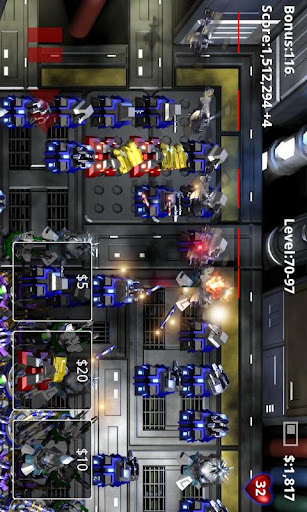
Features of Robo Defense 2.3.2 Android
You most likely inquire us what you will get with this application. The following is description of Robo Defense in accordance with official page on Google Play Store.
Robo Defense is the ultimate portable tower defense experience. Featuring open maps, upgrades, achievements and nice graphics.The full version features 5 maps with unlimited upgrades and difficulty levels.
A free version is also available (try it first!).
Free version progress is automatically imported into the full version, should you choose to upgrade.
HTC Desire, San Francisco: Turning off "High Quality Graphics" fixes known issues.
Galaxy S: Turn on "16-bit Backgrounds" to fix studdering performance issues.
Atrix: Disable sound to improve stability
Performance tips: If the game is running sluggishly, try playing fully "zoomed in". Turning off "High Quality Graphics Mode", in the options menu, will also help on some phone models.
http://lupislabs.blogspot.com
And here would be the extra features inside the most current version of this application, Robo Defense 2.3.2 apk android:
2.3.2:New Features:
- Added Flare unlock disable until mine is purchased.
Bug Fixes:
- Improved sound stability on Galaxy S2.

So, are you interested to install this application to your android device? Download Robo Defense 2.3.2 immediately into your android device from this link.
Senin, 07 Oktober 2013
Samsung Galaxy S III dengan Prosesor 2 Ghz

Jumat, 04 Oktober 2013
Samsung Galaxy Tab 2 10 1 Spesifikasi Harga Review OS Terbaru Kinerja Meningkat

- Network : GSM 850 / 900 / 1800 / 1900. 3G dan HSDPA 900 / 1900 / 2100
- Tipe Layar : PLS TFT capacitive toucscreen, 16 juta warna
- Ukuran Layar : 800 x 1280 pixels, 10.1 inches ( ~149 ppi pixel density), multitouch, Corning Gorilla Glass, TouchWiz UX UI
- Memori : Internal 32 GB storage 1GB RAM dan External microSD, hingga 32GB
- Kamera : Belakang 3.15MP, 2048x1536 pixels dan Depan VGA dan video recoding 720p
- Battery : Standard battery, Li-Po 7000 mAh bisa untuk stand by hingga 2000 jam dan waktu bicara hingga 10 jam
- Data : 3G HSDPA, 21 Mbps, HSUPA, 5.76 Mbps, EDGE, GPRS, WLAN ada Wi-Fi 802.11 a/b/g/n, Wi-Fi Direct, dual band, Wi-Fi Gotspot, Bluetooth v3.0 with A2DP dan USB host support
- OS : Android v4.0.3 ( Ice Cream Sandwich )
- CPU : TI OMAP 4430, Dual-core 1 GHZ Cortex-A9, PowerVR SGX540
- Bowser : HTML, Adobe Flash
- GPS : A-GPS, GLONASS
- Audio Jack : 3.5mm jack audio
- Fitur Lain : Java via java MIDP emulator, TV Out, SNS integration, Organizer, Image/Video editor, Quick Office HD editor/viewer, Google Search, Maps, Gmail, YouTube, Calendar, Google Talk, Picassa integration, Voice Memo, Predictive text input (Swype)
Rabu, 02 Oktober 2013
How to Root Samsung Galaxy SL I9003 on Gingerbread 2 3 6 DDKP1 DDKP2 Firmware
Disclaimer: We should not be held responsible in any manner just in case if anything wrong happens to your device, which is a very unlikely event if you follow the procedure which is mentioned below.
Rooting is a process wherein the system files are provided
- Download respective Rooting packages for your Galaxy SL I9003 from the below mentioned links in your computer and extract the same.
- Assuming that you have downloaded the Rooting package, you now need to backup all your data present in your phone so that just in case if the data gets wiped off or corrupted, the same can be restored easily. With the help of below mentioned tips, you can easily backup or restore the data.
Notes – Backup in the mail so that you can then restore manually
Text messages – Use “SMS Backup & Restore app”,
Phone Contacts – Sync with the Gmail application,
Call Log - Call Log and Restore
Pictures, Music, Videos, Files etc.– Copy to internal / External SD Card,
Internet & MMS Settings – Backup all the settings from the path “Applications > Settings > Wireless and Network > Mobile Networks > Access Point Names”
- Enable the USB debugging from the path Settings > Applications > Development > USB debugging as shown in the below screen capture.
 |
| Learn Android |
- Close all tools in your computer like the Antivirus tools, KIES PC Suite and also the firewalls as these tools tend to interrupt the rooting process. Ensure that the device is left with the charge of minimum 60% so as to ensure that all the issues are sorted out.
- From extracted files, open the Odin executable file and turn Off your phone so as to enter your phone in the Download Mode. The Download mode mode can be entered by pressing Volume Down Key + OK button, and holding both simultaneously press the Power Button.


- After selecting the files, ensure that all the other settings like “Re Partition” etc. are selected properly as mentioned in the below screen capture.
- Once you have selected the file and checked with all the settings, you can now proceed to click on “Start”. Once the process is over, the phone will be rebooted automatically. Please note that the device will take more than normal time to boot.
Just in case if you are facing force close errors then you need to turn off the phone to enter the phone in the recovery mode. You can enter into the recovery mode by pressing up on Volume Down Key + OK button, and holding both simultaneously press the Power Button. Once you enter into the recovery mode, choose the options Wipe data/factory reset and also you need to select Wipe Cache partition and then reboot your device by selecting reboot system now option.
So, that’s it you have now successfully rooted your phone, check you have a superuser app in your application list. Do let us know in the comments section just in case if you face any issues in the process of Rooting as we will try our level best to sort out the same.